AI does the paperwork.
The doctor still signs.
One system for the whole clinic day: front desk, queue, records, prescriptions, GST billing, inventory, and revenue. The AI drafts the notes, the messages, and the purchase orders, and shows its working. It cannot send, spend, or sign — a limit built into the engine, not written into a policy.
India-first: DPDPA-aligned handling, GST-ready billing, and a sealed audit row on every action.
- 35
- clinic screens, each driven end to end
- 2,104
- automated tests, run in CI on every push
- 0
- actions the AI takes without a human
Eleven steps from the door to the till.
Most clinic software is a set of screens that happen to share a login. This is one chain: each step hands the next one everything it needs, and closes what it opened.
- 01
Register
A new patient gets a record number off a gap-free sequence, audited like everything else.
- 02
Book
The diary refuses double-bookings, slots outside working hours, and times already gone.
- 03
Check in
Arrival is a timestamp, not a status. A booking that exists is not a person in the room.
- 04
Call
The queue calls the next token, and the waiting-room screen and the patient’s phone agree.
- 05
Consult
The encounter opens with the record beside it — history, allergies, and the last visit.
- 06
Vitals
Readings out of range are flagged where the doctor is already looking, not in a report.
- 07
Note
The note is drafted from the consultation record. Nothing enters it the record does not support.
- 08
Prescribe
Draft prescriptions are checked against the formulary and the patient’s allergies first.
- 09
Sign
The doctor accepts, edits, or discards each section, then signs. Only then is it the record.
- 10
Invoice
The closed encounter becomes a GST-ready invoice, and the queue entry and booking close with it.
- 11
Collect
Payment settles the bill, and Reports agrees with the till at the end of the day.
That sequence is not a diagram of an intention. It is the path an automated suite drives through the real screens, and the day it produces reconciles against a seeded clinic: three appointments, three arrivals, three patients seen, one bill, and Reports agreeing with the till.
Fourteen screens, running.
Not a mockup and not a storyboard — screen recordings of the software driving itself through a seeded clinic. Pick a chapter, or let it run.
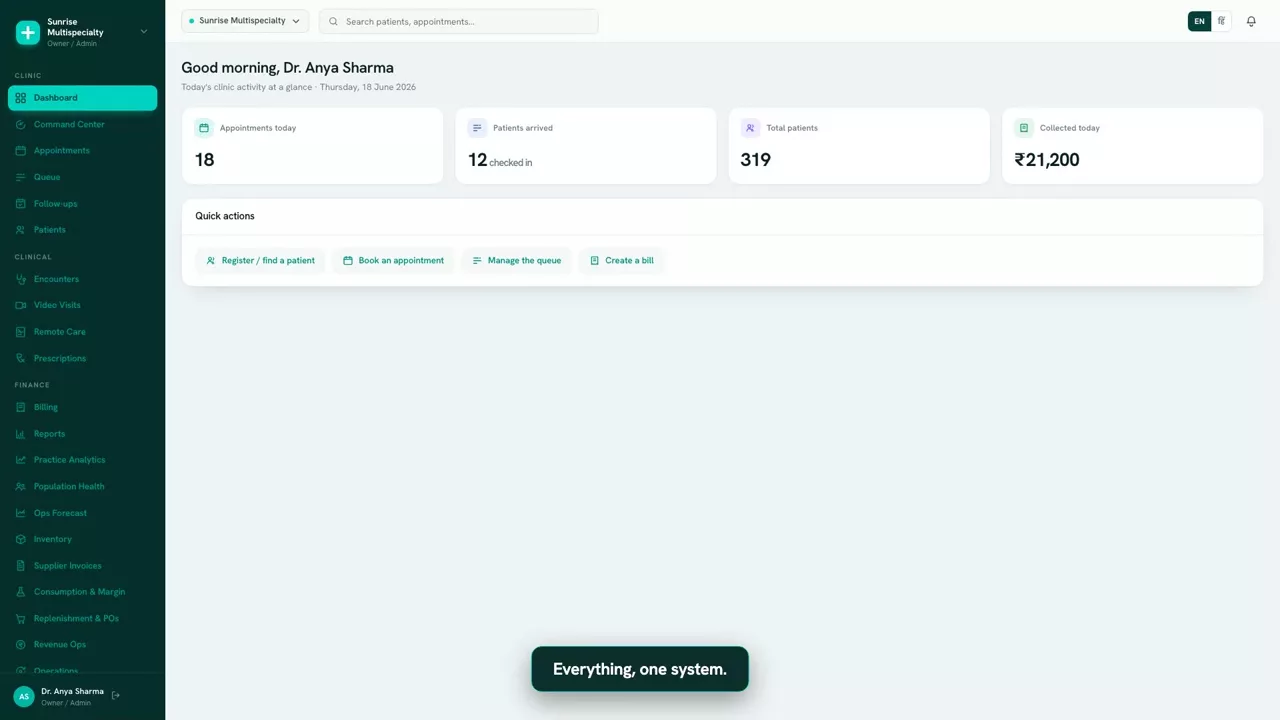
Dashboard
The day so far — patients waiting, patients seen, and money collected, on one screen.
What the AI does, and what it is structurally unable to do.
Every AI feature here is a draft with its evidence attached. The four limits below are not settings somebody could switch off in a hurry.
- Drafts the encounter note from the consultation record, section by section.
- Drafts prescriptions, already checked against the formulary and the patient’s allergies.
- Drafts patient messages — reminders, follow-ups, replies in a WhatsApp thread.
- Proposes purchase orders when consumption says stock is about to run out, with the forecast attached.
- Spend money. A purchase order is a proposal, hard-capped at assisted — there is no setting that makes it automatic.
- Message a patient. Consent, quiet hours and cost all run first, and a person still presses send.
- Change a clinical record. No operations service writes to the record at all; it can only propose a draft through the module that owns it.
- Finalise a bill. Finalising is irreversible, so it stays assisted whatever the tier is set to.
Autonomy is governed per class of action rather than per named automation, so a new automation cannot be configured around the ceilings above. A kill switch stops any of it mid-flight.
What is in the box.
Everything below is built, tested, and driven by the suite that runs on every push.
Front desk and appointments
Scheduling, rescheduling, and follow-up booking, with the double-booking and working-hours checks in the engine rather than in the form.
Queue and tokens
Check-in, the calling order, and a waiting-room view that matches what the patient sees on their phone.
Patient records
One record per patient with a gap-free record number, the history beside the consult, and every read and write audited.
Encounters and notes
Structured encounters with drafted sections the clinician accepts, edits, or discards before signing.
e-Prescriptions
Signed by the practitioner, rendered as a PDF, and shared by an expiring link rather than an attachment that lives forever.
Drug safety checks
Allergy and formulary checks fire against seeded reference data before a draft reaches anybody.
Billing and GST invoices
Encounter to invoice in one step, with per-line discounts, correct place of supply, and gap-free numbering.
Payments and reconciliation
Collection against the bill, a daily till, and reports that agree with it.
WhatsApp messaging
Direct on Meta’s Cloud API with your clinic’s own number. Consent, quiet hours, templates and per-message cost are all enforced before a send.
Inventory and consumption
Stock, batches, expiry, and what each procedure actually consumed — which is where true cost comes from.
Forecast and replenishment
Demand forecasting, stockout risk, and drafted purchase orders that wait for an approval.
Revenue, analytics, and the command centre
Charge capture and reconciliation, practice analytics, and a briefing on what needs attention today.
The same clinic, in a hand.
Not a companion app with a third of the features — the same screens, laid out for a thumb. Front desk staff run the queue from the floor rather than from behind the desk.
Patients get their own way in: a public booking link, one clinic, verified by a code sent to their number. It refuses to confirm whether a clinic code exists, answers identically for a stranger and a known patient, and creates nothing until a code is verified — so it cannot be used to read a clinic’s patient list one guess at a time.
Where the data lives, and who can reach it.
Stated precisely, including the part that is not finished.
DPDPA-aligned by default
The Indian data-protection posture is the default configuration, not an add-on a clinic has to find and switch on.
Region control sets
Move a clinic to the US or the EU and the control set moves with it — data-subject rights, residency, key region. The switch refuses until the BAA or DPA is actually executed.
ABDM, at sandbox
Consent artefacts, care contexts, scope enforcement, FHIR assembly, and the exchange audit are built and tested. The national gateway calls run against the sandbox — we are not certified. ABDM being unavailable never blocks a clinic.
An audit row on everything
Every clinical and financial action writes a sealed audit row covering the whole payload, resolved alerts included.
Tenant isolation, fail-closed
Enforced in the application and again by Postgres row-level security, so a bug in one is not a leak on its own.
Identifiers stripped at the boundary
Patient and government identifiers are redacted before any text leaves the process for a model, and rehydrated on the way back.
The honest list.
A clinic buying software should not have to discover this in month two. Every item below is a connection or a pilot, not a rebuild — and none of it is on this page as though it works.
Video consultations
The consent gate, the recording refusal, and the audit around telemedicine are built and tested. No video platform is connected, so there are no video consults today.
Dictation
The note is drafted from the consultation record. No speech-to-text provider is wired, so nothing is transcribed from audio.
Reading a supplier invoice
Invoice lines are matched, confidence-scored and flagged against the purchase order. Getting those lines off a scanned bill still needs a person — there is no document AI connected.
The phone line
The voice agent’s opening script, transfer paths, voicemail fallback and recording retention all exist. No telephony carrier is connected, so nobody can call it.
Lab and pharmacy partners
Orders and results have a working shape, but against development adapters rather than a real diagnostics or e-pharmacy partner.
Numbers from a real clinic
Every quality figure in the system — calibration, no-show accuracy, disparate impact — is measured against tests, not against patients. Those come from the first pilot.
How a clinic starts.
Two weeks is the target for a single site. Chains take longer, in proportion to branches.
Set the clinic up.
Roles, services, fee schedules, letterhead, your WhatsApp number and payment account, and your existing patient data. We sit with your staff and do it.
Run a day on it.
One real day, assisted, alongside the way you work now. Nothing is switched off until the new path has carried a full day.
Turn things on one at a time.
Each capability has its own switch and a shadow mode where you watch it propose before it can act. Nothing arrives already on.
Who it is for.
Questions a clinic actually asks.
Thirty minutes,
and the software is on the screen.
No slides. We open the clinic day and drive it — register a patient, see them, sign the note, take the money — and you ask whatever you want along the way.